Planner
Auto-generated schedule, drag-and-drop, ICS export
The Planner is your personal practice schedule. After completing onboarding, Respiro automatically generates 8 weeks of breathing sessions and article recommendations tailored to your goals, experience level, health profile, and preferred times. You can adjust your schedule at any time, drag sessions between days, mark them complete, and export everything to your calendar.
How Your Schedule Is Created
After you complete onboarding, Respiro generates a personalized schedule using the intelligent scheduling engine. The system considers:
- Your goals: Stress relief, focus, sleep, energy, meditation, recovery, confidence, digestion, or anxiety relief
- Preferred times: Morning, midday, afternoon, evening, or night - the engine maps these to specific time slots (e.g. morning generates sessions at 7:00, 7:30, 8:00, etc.)
- Practice days: Which days of the week you want to practice (weekdays, every day, or custom)
- Sessions per day: How many sessions you want each practice day
- Health considerations: Conditions like asthma, anxiety, high blood pressure, or pregnancy automatically filter out exercises that may be unsuitable
- Experience level: Beginner, Intermediate, or Advanced determines pattern complexity and session duration
- Daily routine: Wake and sleep times, optional meal times, so sessions are placed around your real schedule
The result is 8 weeks of sessions drawn from the 12 Breathing Spaces, with variety tracking to avoid repetition and logical ordering (e.g. pre-workout before workout times, recovery after).
Schedule Summary
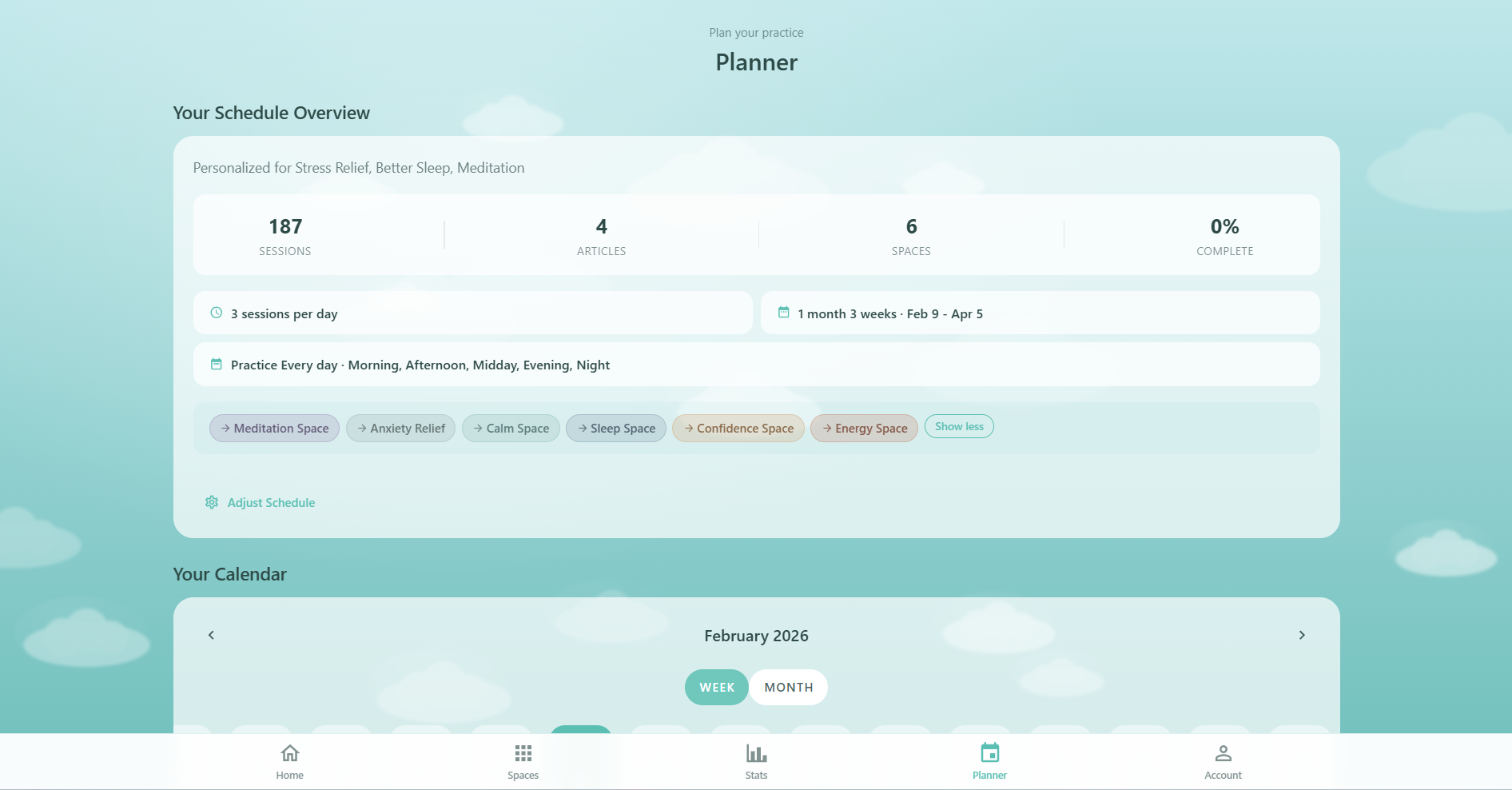
At the top of the Planner page, a summary section shows your schedule at a glance:
- Total sessions: The number of breathing sessions in your schedule
- Total articles: How many recommended articles have been generated
- Spaces used: Which breathing spaces appear in your schedule, displayed as clickable colored chips
- Completion rate: Percentage of sessions you have completed
- Schedule info: Sessions per day, date range (e.g. "8 weeks · Feb 9 - Apr 5"), practice days (e.g. "Weekdays"), and preferred times
- Health notice: If you indicated health considerations during onboarding, a notice reminds you which conditions are being filtered for
- Free / Pro status: Shows your current tier with a crown icon for Pro members
Tap Adjust Schedule to open the Schedule Setup dialog and regenerate your plan with different preferences.
The Calendar
The Planner offers two calendar views that you can toggle between:
Week View (Infinite Scroll)
The default view shows a horizontally scrolling row of days. You can swipe or scroll sideways to move through your schedule. Each day cell shows:
- Day name and number
- A colored dot if sessions are scheduled for that day
- Today's date is highlighted
The week view loads 30 days in each direction from today and lazily adds more days as you scroll toward the edges. Tap any day to see its sessions below.
Month View (v-calendar)
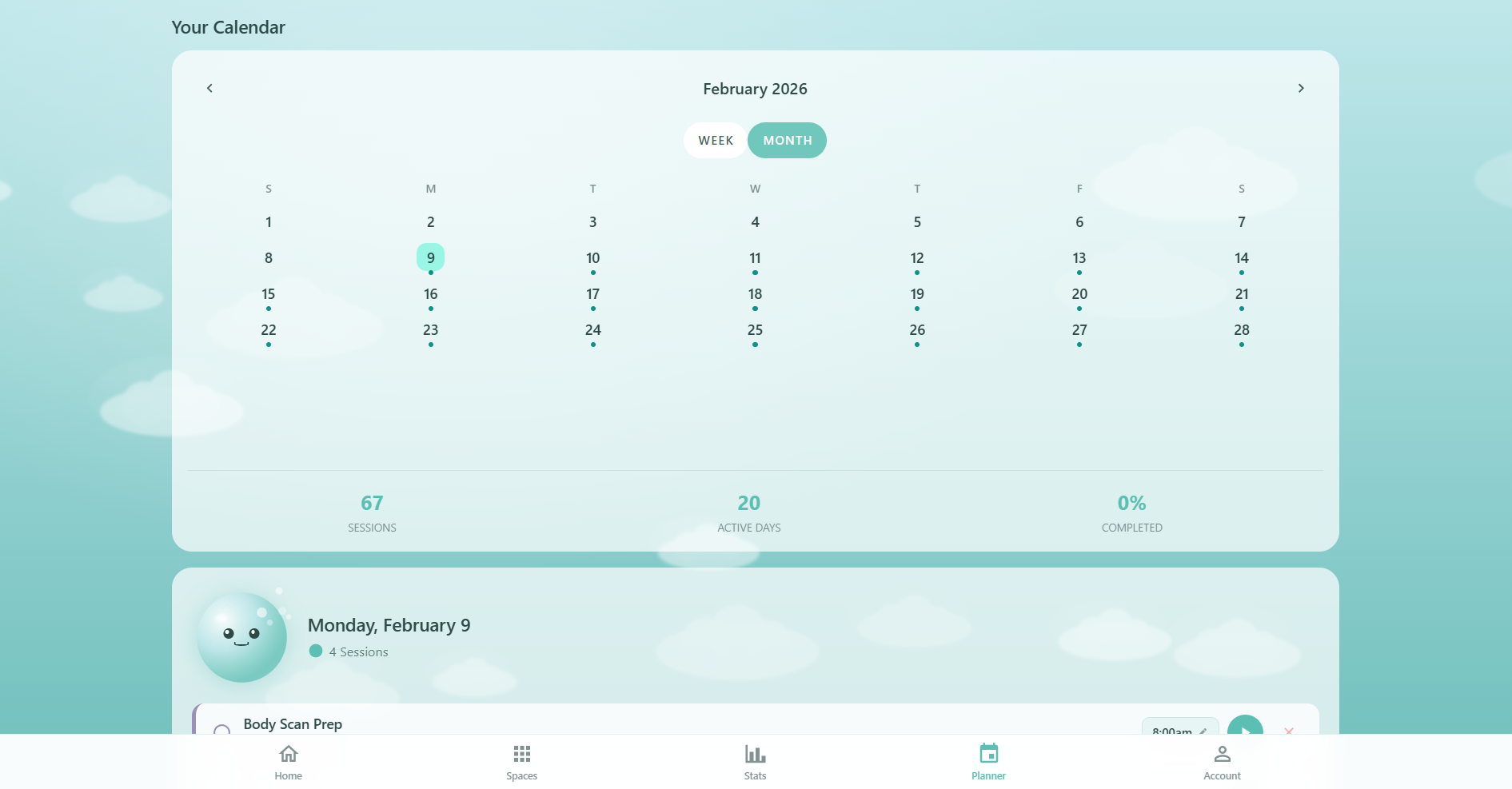
Toggle to the month view to see a full calendar grid. Days with sessions display colored dots:
- Green dot: All sessions for that day are completed
- Yellow dot: Some sessions completed, some remaining
- Teal dot: Sessions scheduled but none completed yet
Below the month grid, stats show total sessions, active practice days, and completion rate for the visible month.
Session Cards
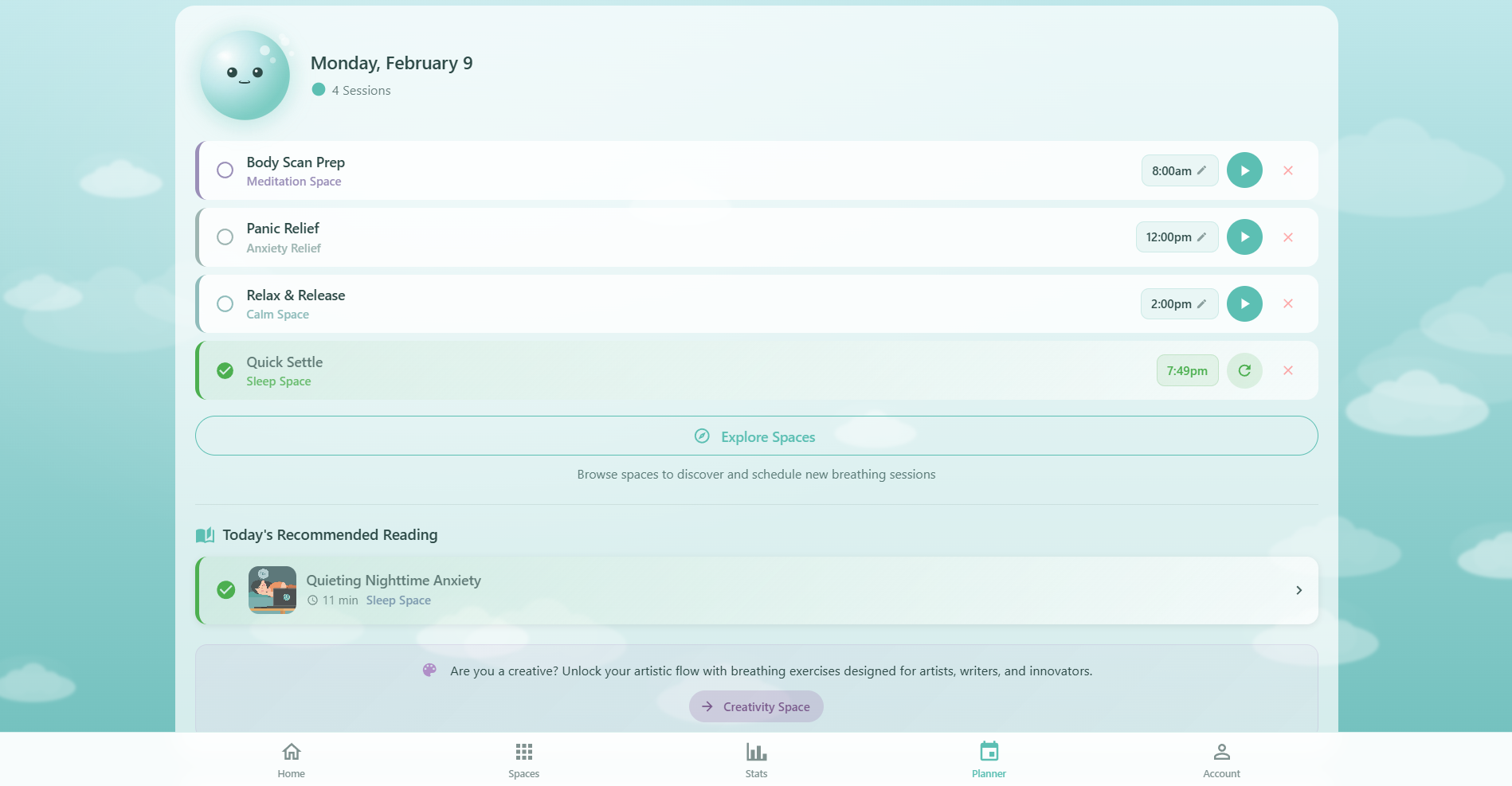
When you select a day, its sessions appear as color-coded cards below the calendar. Each card has a left border matching its Breathing Space color and displays:
- Completion checkbox: Tap the circle to mark a session as complete. It records the actual date and time you finished
- Session name: The routine name (e.g. "Pre-Work Focus") and the breathing space it belongs to
- Time: The scheduled time, which you can tap to change via a time picker
- Play button: Launches the breathing session with the routine's pattern pre-loaded
- Redo button: Appears on completed sessions so you can repeat them
- Delete button: Removes the session with an undo option
Oxy appears alongside the day's sessions with a mood that reflects your progress: celebratory when all sessions are done, encouraging when you're partway through, and gentle when nothing is started yet.
Drag-and-Drop Rescheduling
You can reschedule any uncompleted session by dragging it to a different day:
- On desktop: Click and drag a session card to any day in the calendar. The target day highlights as you hover
- On mobile: Long-press a session card (300ms) to pick it up. You will feel a haptic pulse when drag mode activates. Drag to a day and release to drop
Completed sessions cannot be dragged. After dropping, a confirmation message appears showing the session's new date.
Adding Sessions Manually
Besides the auto-generated schedule, you can add individual sessions:
- Select a day on the calendar
- Tap Add Session below the session list
- Choose a breathing space and routine from the picker
- Set the time using the time picker
- Tap Save to add it to that day
You can also tap Explore Spaces to browse all 12 spaces and add sessions from there.
Recommended Articles
The Planner doesn't just schedule breathing sessions - it also recommends articles to read alongside your practice. The article recommendation engine:
- Schedules 1 article every 2 practice days, plus one on your first day
- Prioritizes articles matching the breathing space of your scheduled sessions (+50 score)
- Boosts articles related to your onboarding goals (+20 score)
- Penalizes recently used spaces (-30 per occurrence in the last 3 articles) to ensure variety
- Never repeats the same article within your schedule
Article cards appear below the session list for each day. They show the title, read time, space name, and a featured image. Tap the checkbox to mark an article as read - the status persists across regeneration and syncs to the cloud for Pro members.
Adjust Schedule
Tap Adjust Schedule in the summary section to open the Schedule Setup dialog. This 5-step flow lets you reconfigure your plan:
- Confirmation: Warning that regenerating will replace your current schedule
- Goals: Multi-select your breathing goals (stress relief, focus, sleep, energy, etc.)
- Profile: Set experience level and health considerations
- Schedule: Choose time preferences, practice days, and sessions per day
- Routine: Set wake and sleep times, plus optional meal times for smarter placement
After completing the setup, the intelligent scheduler generates a fresh 8-week plan with sessions and article recommendations.
Export to Calendar
The Planner can export your sessions to any calendar app (Google Calendar, Apple Calendar, Outlook, etc.) using the ICS standard. Tap Export to Calendar to generate an ICS file containing:
- Event title: "Respiro: [Routine Name]" (e.g. "Respiro: Box Breathing")
- Description: The breathing space, template name, session duration, and a link back to the app
- Time & duration: Your scheduled time and session length with timezone detection
- Reminder: A 10-minute alarm before each session
- Recurring events: Supports RRule-based recurrence (daily, weekly, weekdays, or custom days)
- Categories: Tagged as BREATHING, WELLNESS, RESPIRO for easy filtering
On mobile, the export uses the native Share sheet so you can send the ICS file to any app. On desktop, it downloads as respiro-planner-YYYY-MM-DD.ics.
Oxy Autopilot PRO
Pro members unlock Oxy Autopilot - smart session recommendations that adapt to your patterns. Oxy suggests what to practice based on the time of day, your recent sessions, mood trends from your Journal, and which spaces you haven't visited recently.
Cloud Sync
Your planned sessions, article recommendations, and read status all sync to the cloud when you're signed in. This means your schedule follows you across devices - start planning on your desktop and check today's sessions on your phone. Learn more in the Cloud Sync guide.
Free vs Pro
The Planner is available to all users. Pro members unlock additional scheduling features:
- Full routine access: Schedule any of the 48 routines (free users can schedule from the 12 free routines — 1 per space — plus 24 quick-start sessions are available directly from each space)
- Oxy Autopilot: Smart daily recommendations based on your patterns and mood
- Custom schedule templates: Save and reuse schedule configurations
- Priority cloud sync: Faster sync across all your devices