Support
Get help, give feedback, and manage your account
Respiro's support tools are built into the app. Access the Help & Feedback dialog from the Account page to contact us, browse FAQs, view your feedback history, and check app version info. You can also share the app, restore purchases, export your data, and manage your account — all without leaving Respiro.
Accessing Support
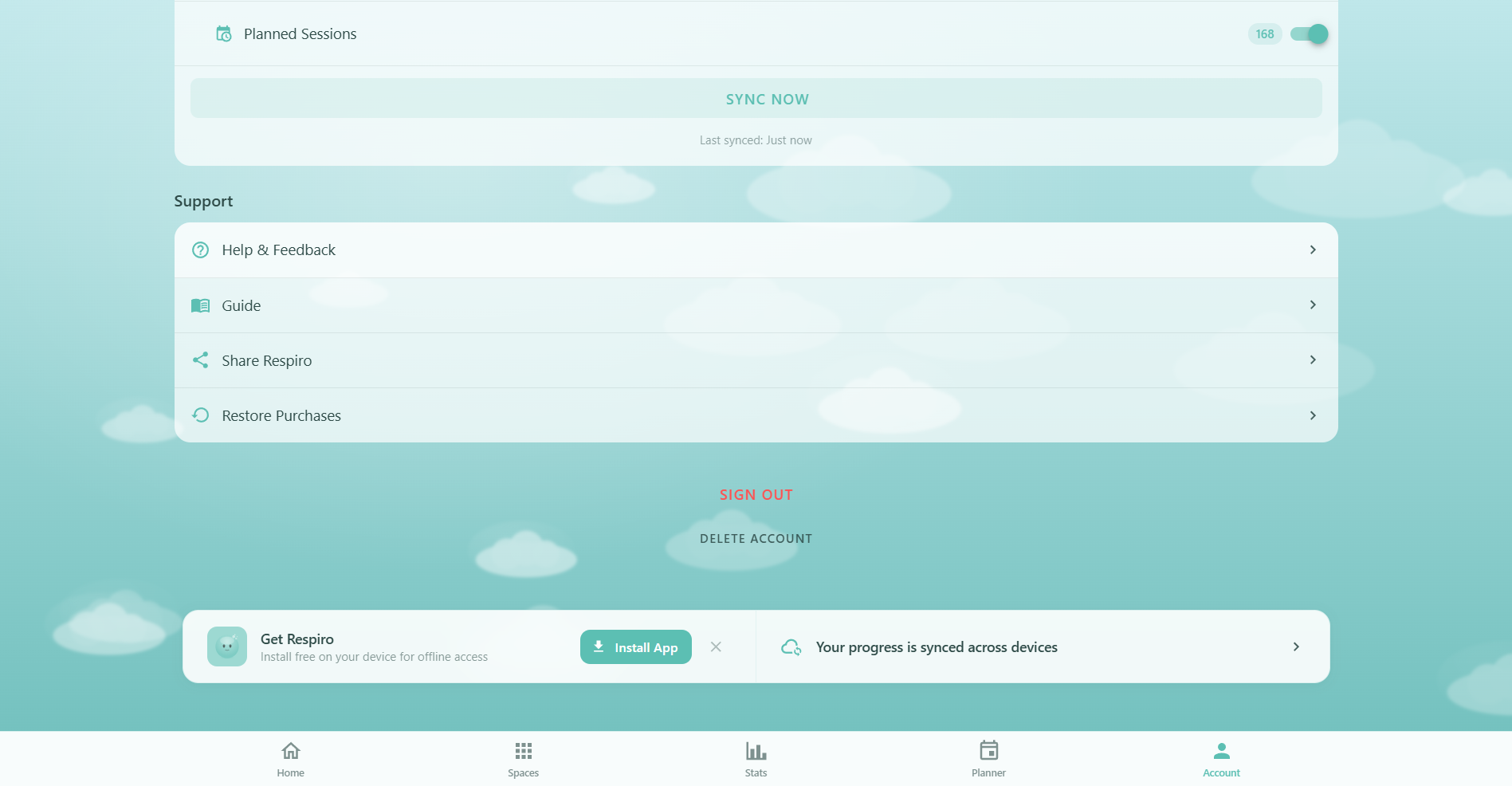
All support features are on the Account page in the Support section. Four buttons give you quick access:
- Help & Feedback: Opens a dialog with contact emails, 6 FAQs, your feedback history, and app version info
- User Guide: Opens this guide at
/guide/— the full documentation for every Respiro feature - Share App: Uses your device's native share sheet to share Respiro with friends (title: "Respiro - Your space to breathe", text: "Find calm through guided breathing exercises")
- Restore Purchases: Checks for and restores any previous Pro subscription. Shows "Your Pro subscription has been restored!" on success, or "No previous purchases found" if none exist
Contact Us
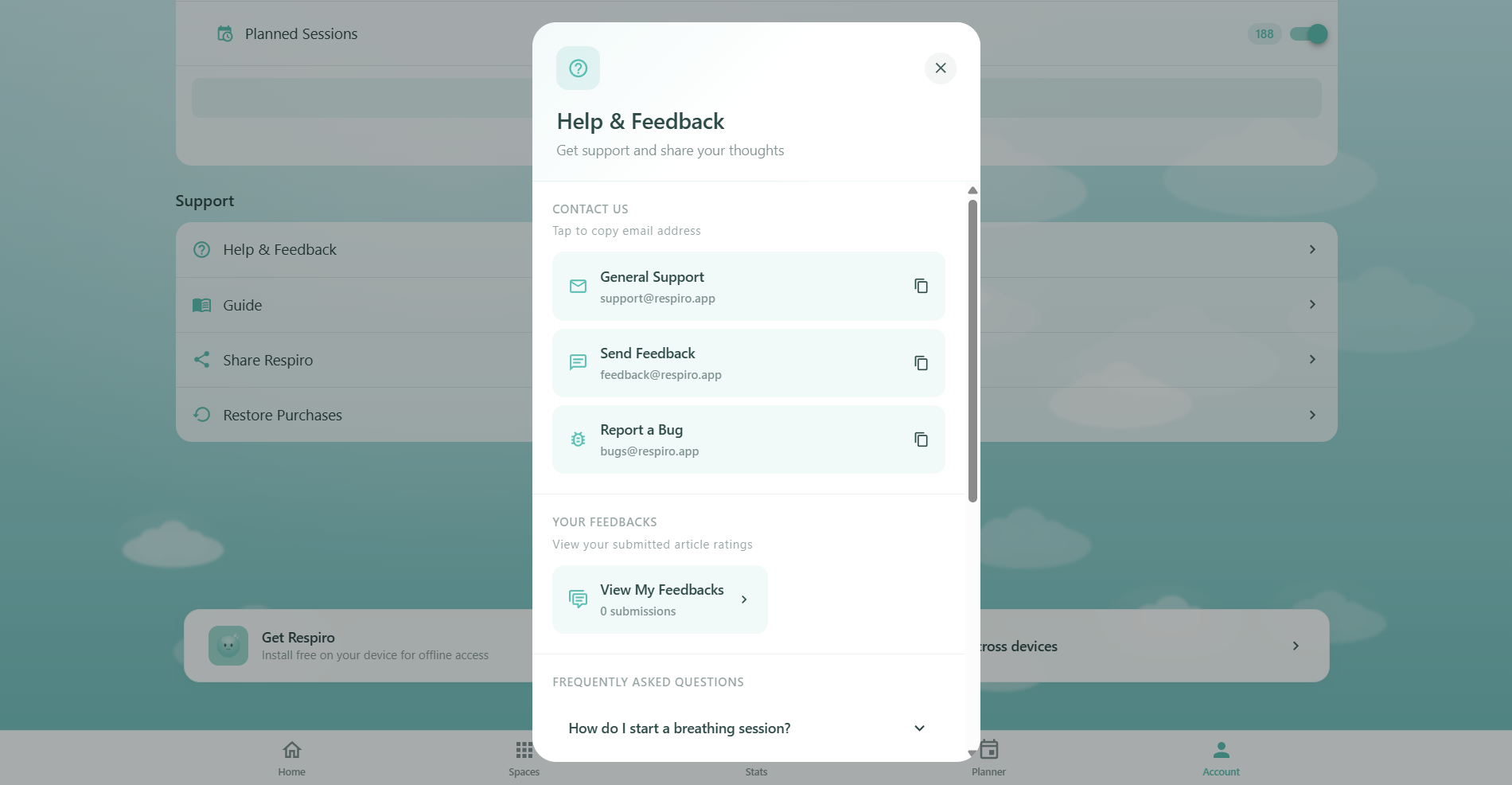
The Help & Feedback dialog provides three direct email contacts. Tap any email to copy it to your clipboard:
- General Support: support@respiro.app — for questions about features, your account, or subscription
- Feedback: feedback@respiro.app — share ideas, suggestions, or feature requests
- Bug Reports: bugs@respiro.app — report something that isn't working correctly
We typically respond within 24-48 hours. Pro members receive priority support with faster response times.
Frequently Asked Questions
The Help & Feedback dialog includes 6 expandable FAQs that answer the most common questions directly in the app:
- How do I start a breathing session? — Tap "Start Breathing" on the home page, navigate to a Space and select a template, or use the Planner to schedule sessions in advance
- What's the difference between Free and Pro? — Free includes essential exercises and basic features. Pro unlocks 50+ premium templates, Oxy Autopilot, advanced statistics, article bookmarks, and priority support
- How does streak tracking work? — Your streak increases each day you complete at least one session. Miss a day and it resets. Pro users can earn streak shields to protect against missed days
- Can I use Respiro offline? — Yes. Once loaded, most features work offline including breathing sessions. Progress saves locally and syncs when you're back online (if signed in)
- How do I cancel my Pro subscription? — Manage your subscription through the platform where you subscribed (App Store, Google Play, or Stripe). Pro features stay active until the end of your billing period
- Is my data private and secure? — All data is encrypted and stored securely. Respiro never sells your data. Links to Privacy Policy and Terms of Service for full details
Article Feedback & Ratings
When you read articles, you can rate them on a 1-5 star scale and leave optional comments. This feedback helps improve Respiro's content:
- Rating: 1-5 stars per article. Articles rated 4+ are automatically marked as "helpful"
- Comments: Optional text feedback about the article content
- Feedback history: The Help & Feedback dialog shows your total submission count and average rating (e.g. "12 articles rated · 4.2 avg")
- Feedback viewer: Tap "View My Feedbacks" to see all your past ratings, including article image, star rating, title, and comment for each
Feedback is tied to your account. If you haven't rated any articles yet, the empty state reads "You haven't rated any articles yet."
Troubleshooting
If something isn't working as expected, try these steps in order:
- Check your connection: Respiro works offline for breathing sessions, but Cloud Sync, sign-in, and subscription features need internet access
- Refresh the app: Close and reopen Respiro, or pull down to refresh. If installed as a PWA, close the app window completely and relaunch
- Check sync settings: Go to Account and verify the "Sync Data to Cloud" master toggle is enabled, along with per-category toggles for the data you expect to sync
- Force sync: Tap the "Sync Now" button on the Account page to trigger an immediate upload. Check the "Last synced" timestamp to confirm
- Sign out and back in: This resets all Firestore listeners and re-authenticates your session. Your cloud data is safe and will sync back
- Contact support: If the issue persists, email bugs@respiro.app with details about what happened, what you expected, and your device/browser info
Export Your Data
Respiro lets you export your data in two formats:
- Journal CSV: Export your breathing journal from the Journal page. The file (
respiro-journal-YYYY-MM-DD.csv) includes 13 columns: date, time, template, duration, cycles, mood before/after/change, energy before/after/change, space, and notes. Free users export up to 5 entries; Pro members export unlimited - Planner ICS: Export your planned sessions from the Planner page. The file (
respiro-planner-YYYY-MM-DD.ics) creates calendar events with session name, breathing space, duration, and a 10-minute reminder. Supports recurring events (daily, weekly, weekdays, custom days) via RRule. Compatible with Google Calendar, Apple Calendar, and Outlook
Delete Account
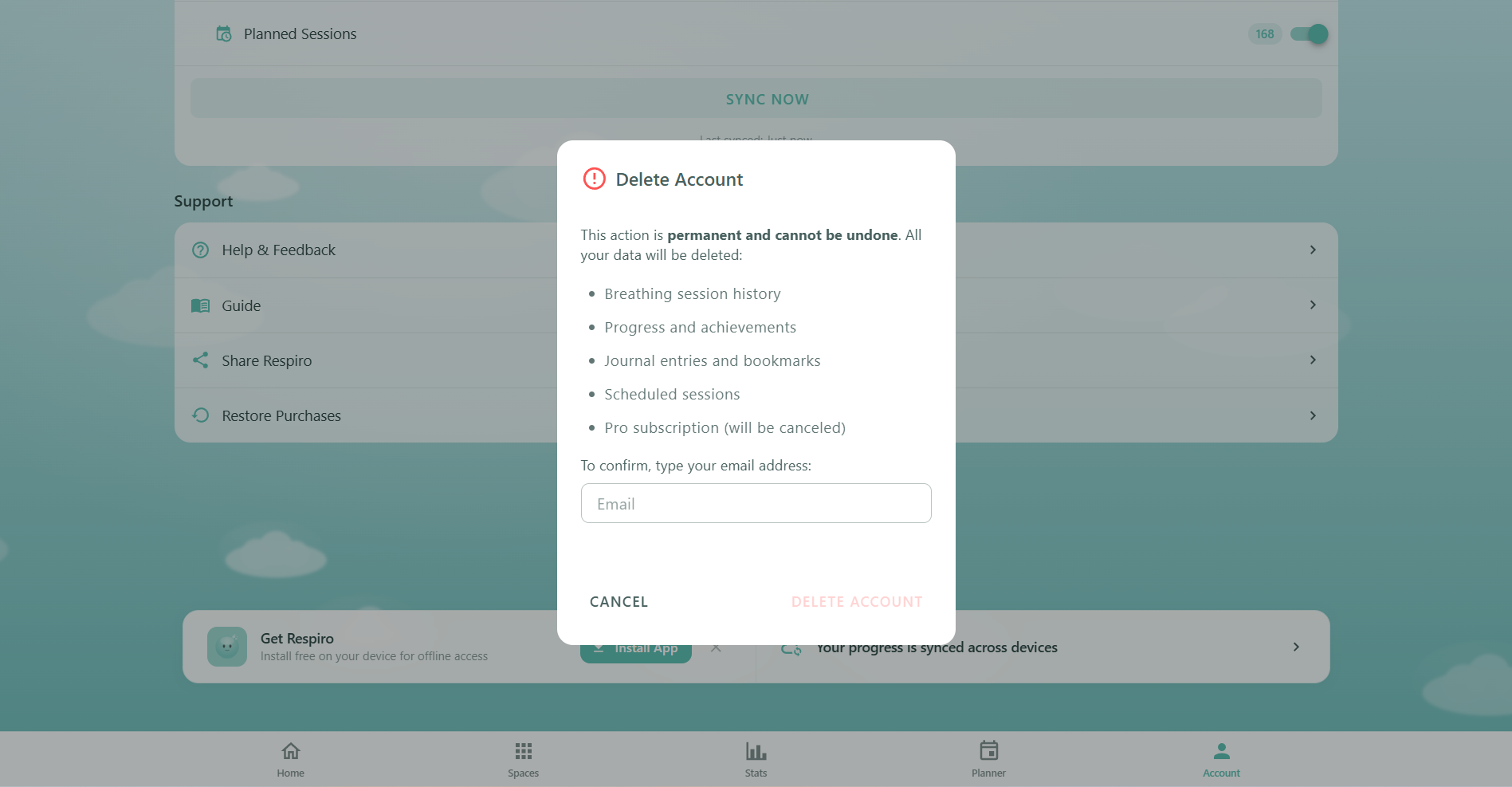
Account deletion is permanent and cannot be undone. The process removes all your data from Respiro's servers:
- Open the dialog: Go to Account page (when signed in) and tap "Delete Account" at the very bottom
- Review the warning: The confirmation dialog lists everything that will be deleted — session history, progress, achievements, journal entries, bookmarks, scheduled sessions, and (if applicable) your Pro subscription
- Type your email: Enter your exact email address to confirm. The delete button stays disabled until the email matches
- Confirm deletion: All Firestore data (11 subcollections including profile, sessions, achievements, journal, bookmarks, challenges, streak, and more) is permanently deleted. If you have a Stripe subscription, it's canceled and the customer record is removed. Your Firebase Auth account is also deleted
If your session has expired, you'll be asked to sign in again before deleting. If any step fails, contact support@respiro.app for assistance.
Privacy & Security
Respiro takes your data privacy seriously:
- Encrypted in transit: All communication uses HTTPS
- Encrypted at rest: Cloud data stored in Firebase Firestore with default encryption
- User isolation: Firestore security rules restrict access to your own data at the
users/{yourUserId}/path. No one else can read or write your data - Granular control: Disable Cloud Sync entirely or per-category. Your data stays on your device in localStorage if you prefer
- No data sharing: Respiro never sells or shares your personal data with third parties
- Right to delete: Account deletion removes all cloud data, Stripe records, and your Firebase Auth account (GDPR-compliant)
Full details available in the Privacy Policy and Terms of Service, linked from the Help & Feedback dialog.
Sign Out
Signing out from the Account page:
- Unsubscribes all real-time Firestore listeners (Cloud Sync stops)
- Clears local session data
- Your cloud data remains safe in Firestore — sign back in anytime and it syncs back
You can continue using Respiro without being signed in. Breathing sessions, local stats, and journal entries work offline. Sign back in from the Account page using Google, Apple, or email.
App Version & Info
The "About Respiro" section at the bottom of the Help & Feedback dialog shows:
- Version: 1.0.0
- Build: 2026.01
- Privacy Policy: Link to
/privacy - Terms of Service: Link to
/terms
Include your app version when contacting support so we can help you more effectively.